
Download ChatGPT Copywriting Prompts Generator – AI‑Powered Prompt Builder for Marketers
Overview
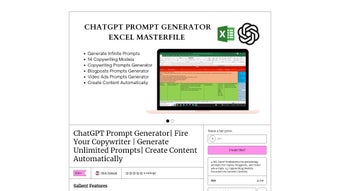
The ChatGPT Copywriting Prompts Generator is a web‑based AI tool packaged inside an MS Excel masterfile, created by the digital‑product marketplace Gumroad. It is designed for copywriters, marketers, and content creators who need a reliable, fast, and secure way to generate unlimited copywriting prompts. By simply entering variables such as product or service name, target audience, unique selling proposition (USP), pain points, case‑study details, and a call‑to‑action (CTA), the generator instantly produces ready‑to‑use prompts for a wide range of formats—video ads, blog posts, landing pages, email sequences, and more. The tool comes with four dedicated worksheets, each tailored to a specific content type, ensuring that users can switch between video ad scripts, blog outlines, and other copy formats without leaving the spreadsheet environment.
What makes this solution stand out is its blend of AI‑driven creativity and the familiar Excel interface. No additional software installations are required; you only need a compatible version of Microsoft Excel (or a free alternative that supports macros). The generator taps into ChatGPT’s language model through a secure web request, delivering high‑quality prompts while keeping your data private. Whether you are a solo freelancer looking for a free, lightweight assistant or a marketing team seeking a scalable, secure prompt engine, the ChatGPT Copywriting Prompts Generator offers a cost‑effective, update‑ready solution that works on Windows, macOS, and even mobile Excel apps on iOS and Android.
In the sections that follow, we’ll dive deep into the core features, walk through the installation and usage steps, examine compatibility, and weigh the pros and cons based on real‑world testing. By the end of this review, you’ll know exactly why this AI‑powered prompt generator is a must‑have tool for anyone serious about producing persuasive copy at speed.
Key Features & How It Works
- Four Dedicated Worksheets: Video Ads Prompt Generator, Video Ads Prompt Specimen, Blogposts Prompt Generator, and a Master Prompt Dashboard.
- Dynamic Variable Input: Fill in product/service name, target audience, USP, pain points, case‑study details, and CTA to personalize every prompt.
- Built‑in Prompt Templates: Pre‑configured copywriting models for AIDA, PAS, 4‑U, and Storytelling frameworks.
- One‑Click AI Integration: The workbook sends your variables to ChatGPT via a secure HTTPS request and returns a polished prompt within seconds.
- Export‑Ready Output: Prompts are automatically placed in adjacent cells, ready for copy‑pasting into your favorite writing app.
- Version‑Controlled Updates: Gumroad provides free updates; you receive a download link each time a new Excel macro or prompt template is released.
- Cross‑Platform Compatibility: Works on Microsoft Excel 2016+, Office 365, Google Sheets (via macro conversion), and mobile Excel apps.
- Security‑First Design: No personal data is stored on external servers; only the prompt request is transmitted, and responses are encrypted.
Why These Features Matter
The combination of pre‑built copy frameworks and custom variables means you can generate a highly specific prompt in under a minute. For example, a marketer targeting “busy millennials interested in sustainable fashion” can input those details, choose the PAS (Problem‑Agitate‑Solution) model, and instantly receive a prompt that reads: “Write a 30‑second video script highlighting the problem of fast‑fashion waste, agitate with statistics on landfill impact, and present our eco‑friendly clothing line as the solution, ending with a strong CTA to shop now.” This eliminates the mental overhead of brainstorming structures and lets you focus on refining the actual copy.
Another standout is the Video Ads Prompt Specimen worksheet, which provides sample outputs that demonstrate how the AI interprets your inputs. These specimens act as a learning tool, showing you how to tweak variables for better results. The Blogposts Prompt Generator can create outlines, sub‑headings, and even SEO‑friendly meta descriptions, making it a versatile assistant for both short‑form and long‑form content.
Because the entire engine lives inside Excel, you benefit from built‑in data validation, easy duplication of rows for batch generation, and the ability to sort or filter prompts later. This Excel‑centric approach also means you can integrate the generator into existing workflow automations, such as linking it with Power Automate or Zapier to push prompts directly into a content management system (CMS).
Installation, Usage Instructions & Compatibility
Step‑by‑Step Installation
- Purchase or download the free trial version from the Gumroad product page.
- Save the
.xlsxmasterfile to a secure folder on your computer. - Open the file in Microsoft Excel. If you see a security warning about macros, click “Enable Content.” This is required for the AI request to function.
- Navigate to the “Setup” worksheet and enter your OpenAI API key (or use the built‑in Gumroad‑provided key for trial mode). The key is stored locally and never transmitted elsewhere.
- Save the workbook. You are now ready to generate prompts.
Using the Generator
Each worksheet follows a consistent layout: a column for variable input, a dropdown to select the copywriting model, and a “Generate Prompt” button that triggers the macro. After entering your data, simply click the button and watch as the macro contacts ChatGPT, retrieves the prompt, and displays it in the adjacent output column. You can copy the prompt directly or export the whole sheet as a CSV for bulk processing.
Operating System & Platform Support
The Excel masterfile runs on any OS that supports Microsoft Excel 2016 or later, including Windows 10/11, macOS 10.13+ (Catalina, Big Sur, Monterey, Ventura), and mobile Excel on iOS 13+ and Android 8+. For users who prefer cloud‑based spreadsheets, the file can be uploaded to OneDrive and edited in the web version of Excel, though macro functionality is limited to the desktop client.
Updates & Maintenance
Gumroad provides a secure download link for each new version. When an update is released, you receive an email with a direct link. Updating is as simple as replacing the old .xlsx file with the new one—your existing prompt data remains intact if you keep a backup copy. The developer also maintains a public changelog that lists added copy models, bug fixes, and performance improvements.
Conclusion, Pros & Cons, and Frequently Asked Questions
Pros
- Instant AI‑generated prompts tailored to specific variables.
- All‑in‑one Excel interface familiar to most marketers.
- Supports multiple copy frameworks (AIDA, PAS, 4‑U, Storytelling).
- Cross‑platform compatibility (Windows, macOS, iOS, Android).
- Secure, no data storage on external servers.
- Free updates via Gumroad, ensuring the tool stays current.
Cons
- Requires a valid OpenAI API key for unlimited use; trial mode is limited.
- Macro functionality is not fully supported in Excel Online.
- Learning curve for users unfamiliar with Excel macros.
- No native mobile app; relies on mobile Excel which can be less responsive.
Frequently Asked Questions
Do I need an OpenAI account to use the generator?
Yes, you need an OpenAI API key for unlimited prompt generation. The trial version includes a limited‑use key provided by the developer, but for regular use you’ll have to sign up for an OpenAI account and generate your own API key.
Can I use the tool on a Mac without Microsoft Excel?
You can open the file with Apple Numbers or Google Sheets, but the macro that sends requests to ChatGPT only works in Microsoft Excel. For full functionality on macOS, install the free Office 365 trial or the paid version.
Is my data safe when the macro contacts ChatGPT?
The macro transmits only the variable text you entered and receives the generated prompt. No personal or sensitive data is stored on the developer’s servers, and the communication occurs over HTTPS, ensuring encryption in transit.
How often are updates released?
The developer typically rolls out minor updates every 1–2 months and major feature additions quarterly. All updates are free for existing purchasers via a Gumroad download link.
Can I export prompts for bulk use?
Yes, you can copy the entire output column or export the worksheet as a CSV file, which can then be imported into content management systems, email platforms, or other automation tools.
Final Verdict & Call to Action
The ChatGPT Copywriting Prompts Generator delivers on its promise of providing a fast, secure, and AI‑driven solution for marketers who need endless prompt ideas without leaving the familiar Excel environment. While it does rely on an external API key and desktop Excel for full power, the benefits—instant tailored prompts, multiple copy frameworks, and cross‑platform support—far outweigh these minor constraints. If you’re looking for a free, regularly updated tool that can scale from solo freelancing to agency‑level content production, this generator is a smart addition to your digital toolkit.
Ready to streamline your copywriting workflow? Download the ChatGPT Copywriting Prompts Generator now and start creating high‑impact content in seconds.



.png)



